

pixel art not translating to alpha well
Reply
|
sagesoap
Advanced
 |
1 week, 5 days ago by sagesoap
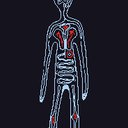
ive read thru the FAQ and some other posts similar to mine but i still haven't found a super suitable solution!i'm trying to make an alpha of my pfp but i can only get Some of lines and almost none of the colors... i personally pixelated it by hand so i know for a fact its a small enough image with only 3 colors but the pattern creator Hates including the red... i've ticked and unticked every box & tested every high and low in the pattern generator and it just never comes even close to how i'd like it to be. if it turns out the only option would be to enter the whole pattern by hand then i will! i just really appreciated the idea of convenience from the 'alpha from image' generator thank you! |
|
halokiwi
Moderator
 |
1 week, 5 days ago by halokiwi
What are the dimensions of your pattern? Braceletbook only supports 200x200 pixels maximum. If you are using "alpha from image" make sure that you are setting the height and width big enough. You will get the most accurate results if one pixel in your design is represented by just one actual pixel. So download your image in the lowest resolution possible and the retry using "alpha from image". If your pattern is bigger than 200x200, you can try making it as two patterns. |
Reply


